# Training
Training Videos, Tutorials, Manuals
# Microsoft Training
Training videos, tutorials, and manuals for Microsoft Operating system and Applications
# Microsoft Office Training
#### Office 365 Boot Camp
[Office 365](https://techsoup.course.tc/catalog/track/office-365-bootcamp)
#### Microsoft Teams Training
##### Microsoft
[Microsoft Teams Video Training](https://support.office.com/en-us/article/Microsoft-Teams-video-training-4f108e54-240b-4351-8084-b1089f0d21d7 "Microsoft Teams Video Training")
##### Techsoup (Free for Non-Profits)
[Microsoft Teams 101](https://techsoup.course.tc/catalog/course/teams-101 "Microsoft Teams 101")
[Microsoft Teams 201](https://techsoup.course.tc/catalog/course/teams-201 "Microsoft Teams 201")
#### SharePoint
##### Techsoup
[Sharepoint-101](https://techsoup.course.tc/catalog/course/sharepoint-101)
# Online Technology Safety
# Scams – Spam, Phishing, Spoofing and Pharming
##### **Learn more about Online Scams:**
- **[Scams – Spam, Phishing, Spoofing and Pharming | Be in Charge of Your Digital Life | Cybersecurity Awareness Program: Lubbock | TTU](https://www.ttu.edu/cybersecurity/lubbock/digital-life/digital-identity/scams-spam-phishing-spoofing-pharming.php)**
- **[Spoofing and Phishing — FBI](https://www.fbi.gov/how-we-can-help-you/safety-resources/scams-and-safety/common-scams-and-crimes/spoofing-and-phishing)**
#### **Email Safety**
##### **See it so you don't click it**
**[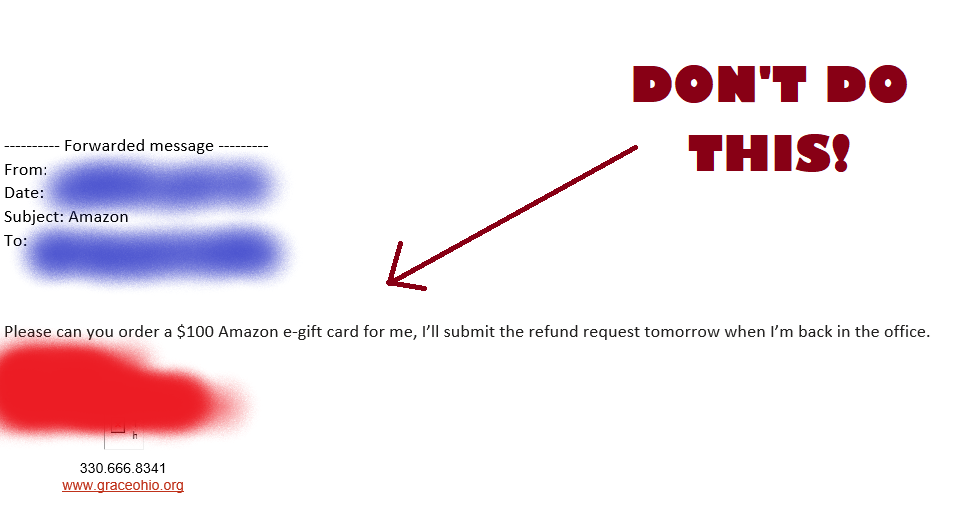](https://kb.gracechurches.org/uploads/images/gallery/2023-03/image-1679503981179.png)**
The signs can be subtle, but once you recognize a phishing attempt you can avoid falling for it. Here are some quick tips on how to clearly spot a fake phishing email:
- Contains an offer that's too good to be true
- Appears to come from a "person of interest" or someone else whom you don't normally communicate with
- Language that's urgent, alarming, or threatening
- Poorly-crafted writing with misspellings, and bad grammar
- Greetings that are ambiguous or very generic
- Requests to send personal information
- Urgency to click on an unfamiliar hyperlinks or attachment
- Strange or abrupt business requests
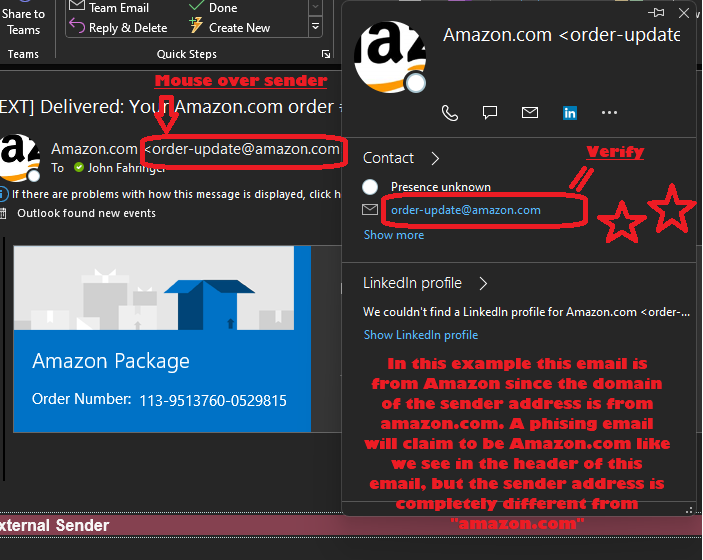
- Sending e-mail address doesn’t match the company it's coming from
You can *always* "fact check" an email sender if you catch something unusual with the email. Do this by looking specifically at the sender address. For example, if their email address domain doesn't end in gracechurches.org, graceohio.org, or gracegeorgia.org, then the email was definitively sent from outside of our organization. Take a look at the below example of the sender address for Amazon:
Sender Address Example
[](https://kb.gracechurches.org/uploads/images/gallery/2023-03/image-1679507376235.png)
***NEVER EVER*** open any attachment in an email originating from outside that you don't recognize. This attachment is very likely designed to compromise your computer and cause very bad things to happen.
v v v
[](https://kb.gracechurches.org/uploads/images/gallery/2023-03/image-1679509571300.png)
For this very reason, we don't allow ZIP files to be sent/received via email in our tenant since malware in a ZIP file can easily mask itself from antivirus scans and avoid malicious detection. If you or someone you know is trying to send several files to the other person, look into using cloud storage like OneDrive or Google Drive to share files from there. Reference our Sharing guide for OneDrive and SharePoint if you need to share several files: [Share Links with Non S... | Grace Church KB (gracechurches.org)](https://kb.gracechurches.org/books/sharepoint-onedrive/page/share-links-with-non-staff-users)
# Keeper Secuity - Password Vault
Onboarding steps, Tutorial videos
# Tutorials
Keeper 101 Tutorial Videos and User Guides:
1. [Keeper 101: Web Vault](https://vimeo.com/showcase/9528990 "Web Vault Videos")
2. [Keeper 101: Browser Extension](https://vimeo.com/showcase/9529024 "Browser Extension Videos")
3. [Keeper 101: iOS](https://vimeo.com/showcase/9528949 "iOS Videos")
4. [Keeper 101: Android](https://vimeo.com/showcase/9528965 "Android Videos")