# Keeper - Password Manager
# Keeper Security
[](https://kb.gracechurches.org/uploads/images/gallery/2024-03/kAsimage.png "https://keepersecurity.com/vault/")
Keeper is a password manager, similar to BitWarden and others, that Grace IT is paying for. You can let Keeper manage your passwords and automatically fill out account credentials on website logins for you through the browser extension. You can also collaborate: Update passwords for your team or other people without worrying about corrupting a password entry or creating conflicts.
#### **Licensing and Setup**
We are currently prioritizing licensing to the following:
- Information Technology
- Finance
- Human Resources
- Pastors
- Directors
- Admins and Assistants to the above positions
When we license you up, you will be able to login to Keeper using SSO through your GraceOhio / GraceChurches account
##### Logging in For First Time
Go to Keeper Vault site at [Keeper® Password Manager & Digital Vault (keepersecurity.com)](https://keepersecurity.com/vault/).
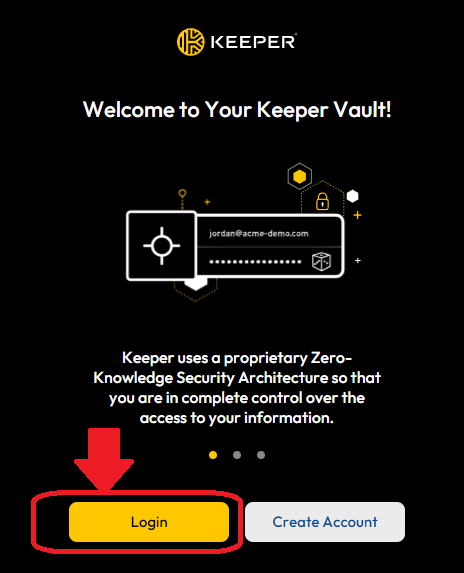
Choose "Login":
[](https://kb.gracechurches.org/uploads/images/gallery/2024-03/Wzmimage.png)
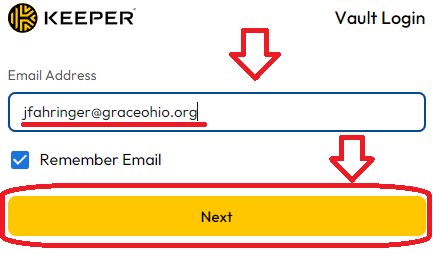
On the next screen, enter your graceohio credentials in the email address field, and hit next.
[](https://kb.gracechurches.org/uploads/images/gallery/2024-03/vHpimage.png)
Sign into your Grace Church Office365 account if prompted. Keeper will walk you through setting up the import of your passwords, and Browser Extension.
##### Personal Use License
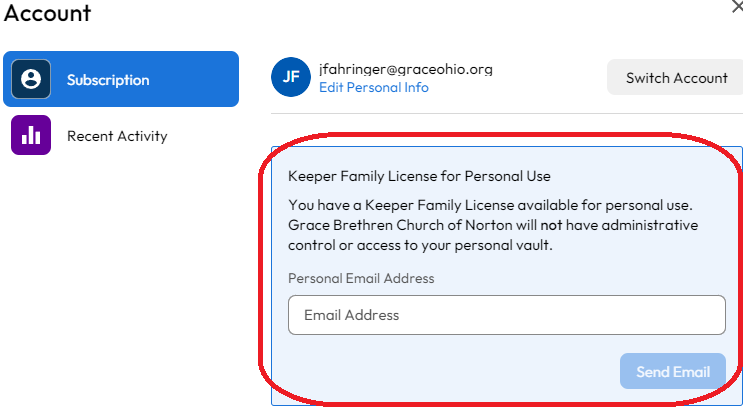
As a bonus with the Enterprise licensing, Keeper comes with a *Keeper Family License for Personal Use*. You have the option to use this if you want. It will allow you to isolate your Personal passwords from your Work passwords. We won't be able to look at these passwords stored here.
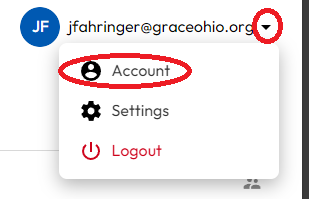
In the Keeper WebVault, click on your email to open a dropdown menu and click on Account.
[](https://kb.gracechurches.org/uploads/images/gallery/2024-03/Fr8image.png)
You can put in your Personal Email Address you want to assign for your Personal Vault.
[](https://kb.gracechurches.org/uploads/images/gallery/2024-03/vKqimage.png)
#### **Interfaces**
There are a few ways to utilize Keeper. These are the browser extension (KeeperFill), Web Vault, Keeper for Desktop, and Keeper for Mobile.
##### Browser Extension (KeeperFill):
KeeperFill runs as a browser extension on your internet browser. We recommend everyone using Keeper to at least use this, as it allows Keeper to fill in login fields for you and let's you set and change passwords automatically. It is compatible on Chrome, Firefox, Safari, Edge, Opera, and Brave. Download and follow setup instructions here: [Download Keeper Password Manager for iOS, Android, Mac, PC and more (keepersecurity.com)](https://www.keepersecurity.com/download.html?t=f)
##### Web Vault
The Web Vault is the main interface view of Keeper. This view gives more functionality of managing your passwords, like creating folder structures, creating shared folders, and other personalization features.
[https://www.keepersecurity.com/vault/#/lang/en\_US](https://www.keepersecurity.com/vault/#/lang/en_US)
##### Keeper for Desktop
[Download Keeper Password Manager for iOS, Android, Mac, PC and more (keepersecurity.com)](https://www.keepersecurity.com/download.html?t=d)
##### Keeper for Mobile
[Download Keeper Password Manager for iOS, Android, Mac, PC and more (keepersecurity.com)](https://www.keepersecurity.com/download.html?t=m)
#### **Training Resources**
Check out: [Keeper Secuity - Passw... | Grace Church KB (gracechurches.org)](https://kb.gracechurches.org/books/training/chapter/keeper-secuity-password-vault) for basic Keeper Usage.
Refer to your Browser's guide for turning off passwords so that Keeper and your internet browser password manager aren't fighting with each other. For Chrome, look at [Stop Chrome from Savin... | Grace Church KB (gracechurches.org)](https://kb.gracechurches.org/books/applications-98f/page/stop-chrome-from-saving-passwords) and [Delete All Saved Passw... | Grace Church KB (gracechurches.org)](https://kb.gracechurches.org/books/applications-98f/page/delete-all-saved-passwords-in-chrome)