# How to Update Google Chrome

**<span data-contrast="auto">How to update Google Chrome on Windows 10 and MacOS</span>**<span data-ccp-props="{"201341983":0,"335559739":160,"335559740":259}"> </span>

- <span data-contrast="auto">Open the Google Chrome web browser if you have not done so already.</span><span data-ccp-props="{"201341983":0,"335559739":160,"335559740":259}"> </span>
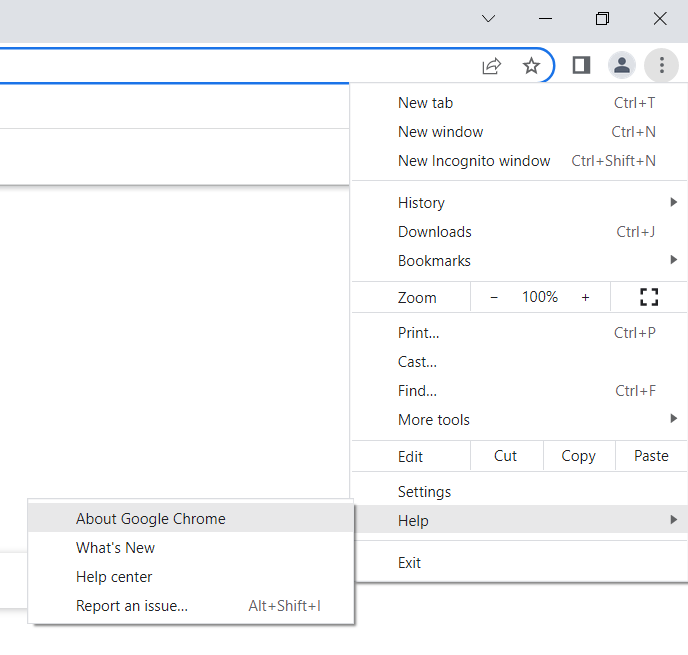
- <span data-contrast="auto">Click on the more button (three vertical dots on the top right corner of the web page).</span><span data-ccp-props="{"201341983":0,"335559739":160,"335559740":259}"> </span>

<span data-ccp-props="{"201341983":0,"335559739":160,"335559740":259}"> [![Screenshot 2022-04-05 104846.png](https://kb.gracechurches.org/uploads/images/gallery/2022-04/scaled-1680-/screenshot-2022-04-05-104846.png)](https://kb.gracechurches.org/uploads/images/gallery/2022-04/screenshot-2022-04-05-104846.png)</span>

- <span data-contrast="auto">Hover over the help option.</span><span data-ccp-props="{"201341983":0,"335559739":160,"335559740":259}"> </span>

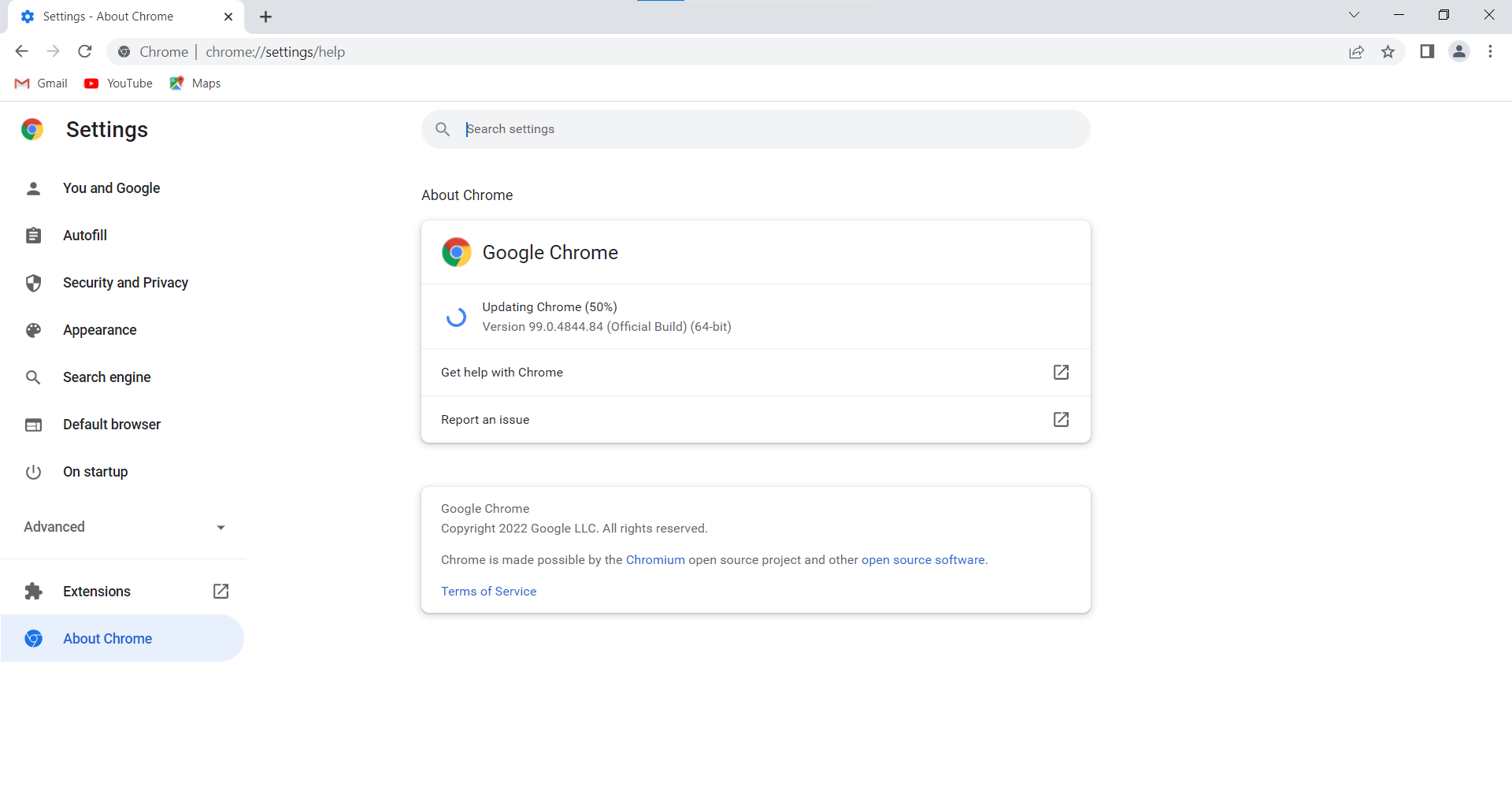
- <span data-contrast="auto">Click About Google Chrome in the new menu.</span><span data-ccp-props="{"201341983":0,"335559739":160,"335559740":259}"> </span>

<span data-ccp-props="{"201341983":0,"335559739":160,"335559740":259}"> [![Screenshot 2022-04-05 104944.png](https://kb.gracechurches.org/uploads/images/gallery/2022-04/scaled-1680-/screenshot-2022-04-05-104944.png)](https://kb.gracechurches.org/uploads/images/gallery/2022-04/screenshot-2022-04-05-104944.png)</span>

- <span data-contrast="auto">If an update is available, click Update Google Chrome (If the button is not available, it means that you are already up to date.</span><span data-ccp-props="{"201341983":0,"335559739":160,"335559740":259}"> </span>

<span data-ccp-props="{"201341983":0,"335559739":160,"335559740":259}"> [![Screenshot 2022-04-05 105018.png](https://kb.gracechurches.org/uploads/images/gallery/2022-04/scaled-1680-/screenshot-2022-04-05-105018.png)](https://kb.gracechurches.org/uploads/images/gallery/2022-04/screenshot-2022-04-05-105018.png)</span>

- <span data-contrast="auto">Click Relaunch. </span>**<span data-contrast="none">Please ensure that all important web pages are properly saved and closed before proceeding with this step.</span>**<span data-ccp-props="{"201341983":0,"335559739":160,"335559740":259}"> </span>