# Zoom
# Zoom - Claiming the Host Role
## Claiming host using the desktop client
Follow these steps if you need to claim the host role when you join a meeting and [join before host](https://support.zoom.us/hc/en-us/articles/202828525) is enabled.
1. Join the meeting.
2. Click **Participants.
**
3. Click **Claim Host** at the bottom of the participants list.

4. Enter your host key.
5. Click **Claim Host.** Once the host key is verified, you will have host controls in the meeting.
# Creating Zoom meetings & add appointments in Outlook - Instructions
Here is the link for how to make Zoom meetings and organize them in our Outlook Environment:
ZoomInstructions - Copy.docx
[ZoomInstructions - Copy.docx (sharepoint.com)](https://gracechurchohio.sharepoint.com/:w:/r/sites/30-in-30Files/_layouts/15/Doc.aspx?sourcedoc=%7B37100E1E-7BC6-491E-A0B1-475EE6E0BD20%7D&file=ZoomInstructions%20-%20Copy.docx&action=default&mobileredirect=true)
# How to Update Zoom
**How to update Zoom Desktop for Windows 10 and MacOS**
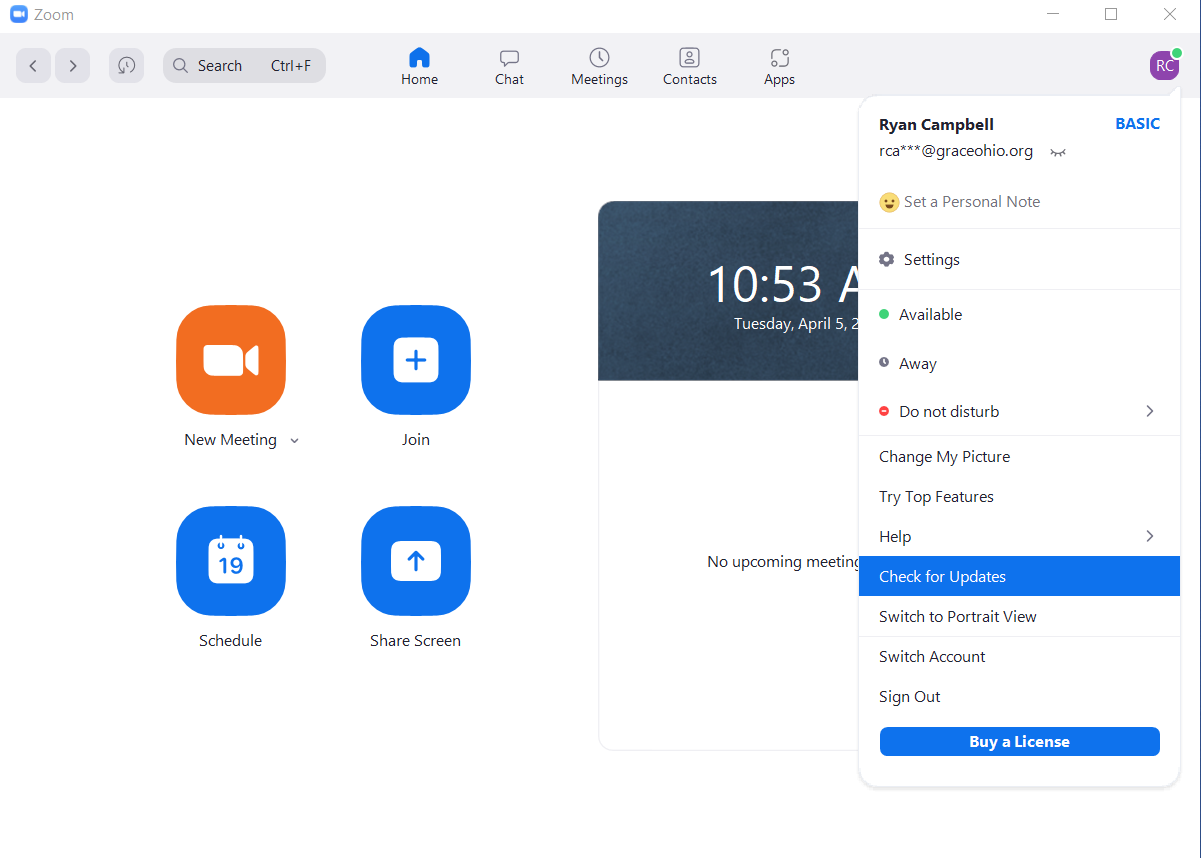
- Open the Zoom Desktop application.
- Click on the profile icon on the top right corner of the page.
- Click Check for Updates.
[](https://kb.gracechurches.org/uploads/images/gallery/2022-04/screenshot-2022-04-05-105345.png)
- If a new version is available, Zoom will automatically begin to download the update.
- Once the update has finished, click install. **Zoom will reset after this.**
- Once the log in page displays, enter in your login credentials.
# Grab Zoom Account MFA Code - From Zoom Mailbox
Because our Church uses Zoom accounts sort of in an unintended way, **Zoom will frequently require MFA sign-ins with our licensed Campus Zoom accounts.** This is because more than one person will often login from different locations when they are trying to setup Zoom meetings. These Zoom accounts are managed by Grace IT, and all the MFA codes are sent over email to a Shared Mailbox: **Grace Church Zoom**. All of Grace Staff can request access to this mailbox (we do need to add you manually to it), so that you can grab the MFA code if you need it.
#### **MFA Code Expiration**
Be aware that when a MFA code is generated, the code is only valid for 10 minutes. Be sure to have your Outlook client ready so that you can find the code to complete sign in to a Zoom account.
### **Windows Outlook Application**
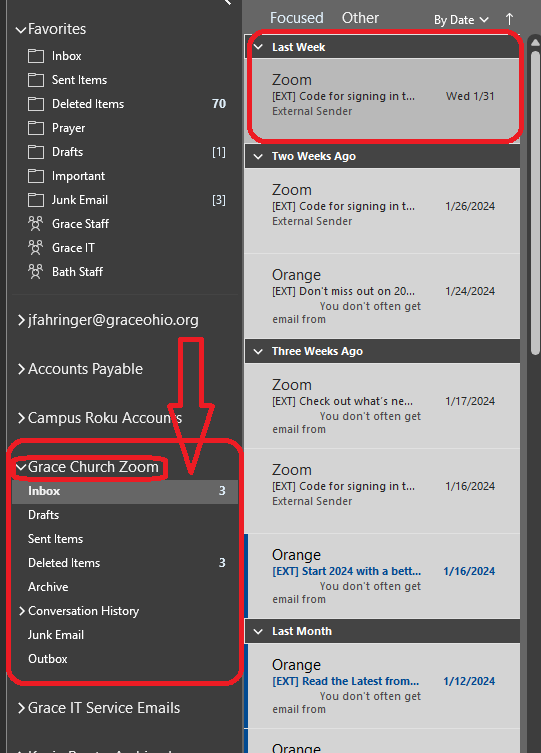
By default, the Grace Church Zoom Mailbox shows up as an additional mailbox under your GraceOhio mailbox. For example:
[](https://kb.gracechurches.org/uploads/images/gallery/2024-02/Zpbimage.png)
### **Web Outlook / macOS**
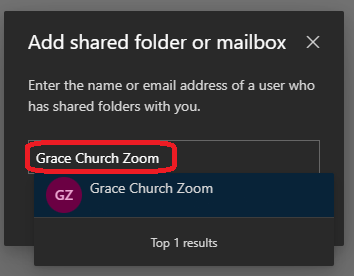
On the Web Outlook [Mail - Outlook (office.com)](https://outlook.office.com/mail/), or on the macOS client, any Shared Mailbox you want to view you will have to add yourself. Please follow this guide for instructions on how to [Add Shared Mailbox to ... | Grace Church KB (gracechurches.org)](https://kb.gracechurches.org/books/applications-98f/page/add-shared-mailbox-to-your-outlook).
[](https://kb.gracechurches.org/uploads/images/gallery/2024-02/EVgimage.png)