Firefox
- How to update Mozilla Firefox
- Clear Cookies and Cache - Mozilla Firefox
- Enable TouchScreen KeyBoard in FireFox
How to update Mozilla Firefox
Update Firefox to the latest release | Firefox Help (mozilla.org)
- Click the menu button
 at the right side of the Firefox toolbar, go to , and select . The About Mozilla Firefox window will open.
 - Firefox will check for updates automatically. If an update is available, it will be downloaded.
- When the download is complete, click .


Clear Cookies and Cache - Mozilla Firefox
How to clear the Firefox cache | Firefox Help (mozilla.org)
Clearing browser cache and cookies can also help solve GraceLink loading incorrectly.
The Firefox cache temporarily stores images, scripts, and other parts of websites you visit in order to speed up your browsing experience. This article describes how to clear the cache.
- To clear your history (cookies, browsing history, cache, etc.) all at once, see Delete browsing, search and download history on Firefox.
Table of Contents
Clear the cache (or Cookies)
- Click the menu button
 and select .
 - Select the panel.
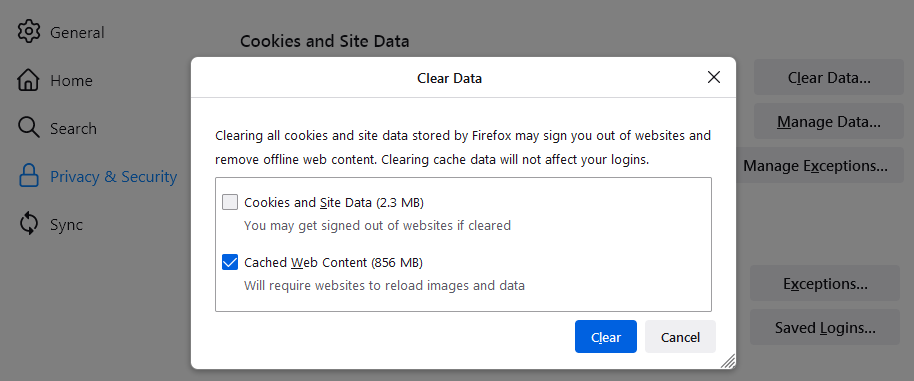
- In the Cookies and Site Data section, click .
-
- Remove the check mark in front of Cookies and Site Data IF you want to only delete cache. Checkmark it if you want to also delete Cookies and Site Data.
- For more information about managing site data, see Manage local site storage settings.
- With Cached Web Content check marked, click the button.
- Close the about:preferences page. Any changes you've made will automatically be saved.

Tip: Here's another way to clear the Firefox cache:
- Click the menu button to open the menu panel.
- Click and select .
- Next to Time range to clear, choose Everything from the drop-down menu, select Cache in the items list, make sure other items you want to keep are not selected and then click the button. You can also select Cookies if you want to clear them.

Automatically clear the cache (or cookies)
You can set Firefox to automatically clear the cache when Firefox closes:
- Click the menu button and select .
- Select the panel and go to the History section.
- In the drop-down menu next to Firefox will, choose .
-
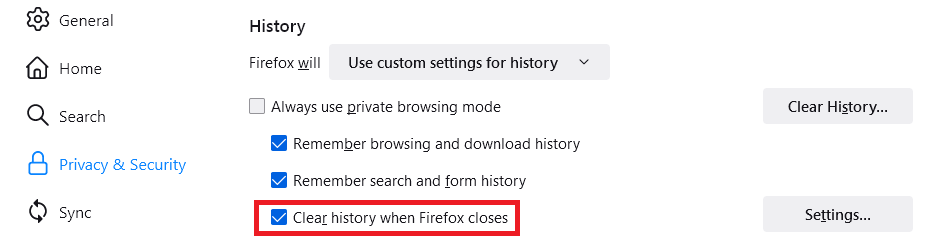
- Select the check box for Clear history when Firefox closes.
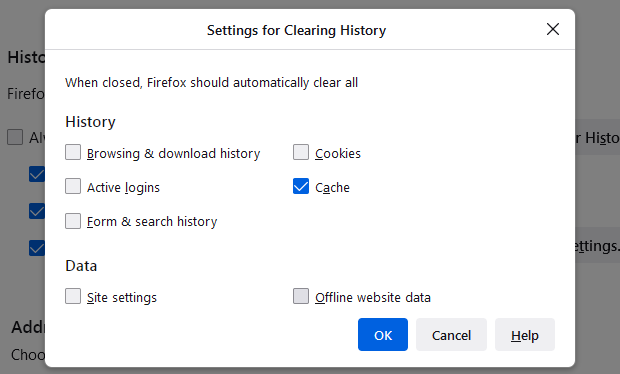
- Click the button. The Settings for Clearing History window will open.
- Put a check mark next to Cache (or Cookies) and make sure other items you want to keep are not selected.
- For more information about other settings, see Delete browsing, search and download history on Firefox.
-
- Click to close the Settings for Clearing History window.
- Close the about:preferences page. Any changes you've made will automatically be saved.

Tip: There are several add-ons available that allow you to clear the cache using an icon on your toolbar. Go to the Mozilla Add-ons Web Page to do a search. The Mozilla community is not responsible for maintaining and supporting third-party add-ons. Please contact the add-on developer directly if you need assistance with an add-on.
Enable TouchScreen KeyBoard in FireFox
source: How to Display On-Screen Keyboard in Mozilla Firefox (trishtech.com)
Enabling this setting is useful for our Touchscreen enabled GraceLink CheckIn stations:
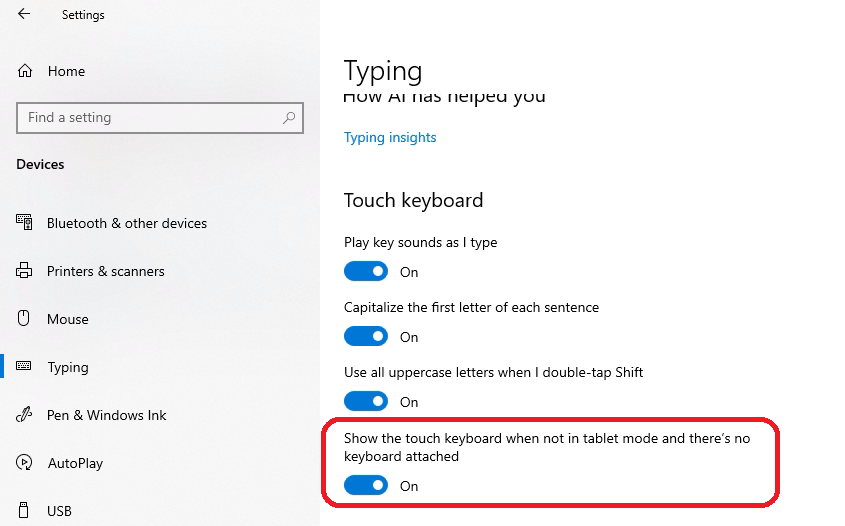
- First Go into the settings App in Windows. On Windows 10, Navigate to Devices, Typing.
- Enable "Show the touch keyboard when not in tablet mode and there's no keyboard attached" setting.

- Now Open Firefox
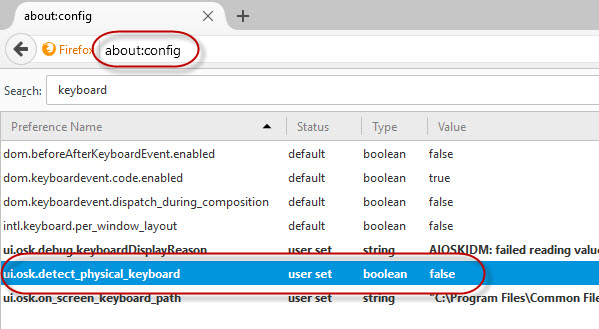
- enter in the address field about:config
- search for detect or keyboard. You will need to change the ui.osk.detect_physical_keyboard config to false.

- Restart Firefox and the onscreen Keyboard should show up when you tap on a text field in FireFox.